Notiro desktop
Notiro Just Speak
Wherever You Can Type, You Can Just Speak.
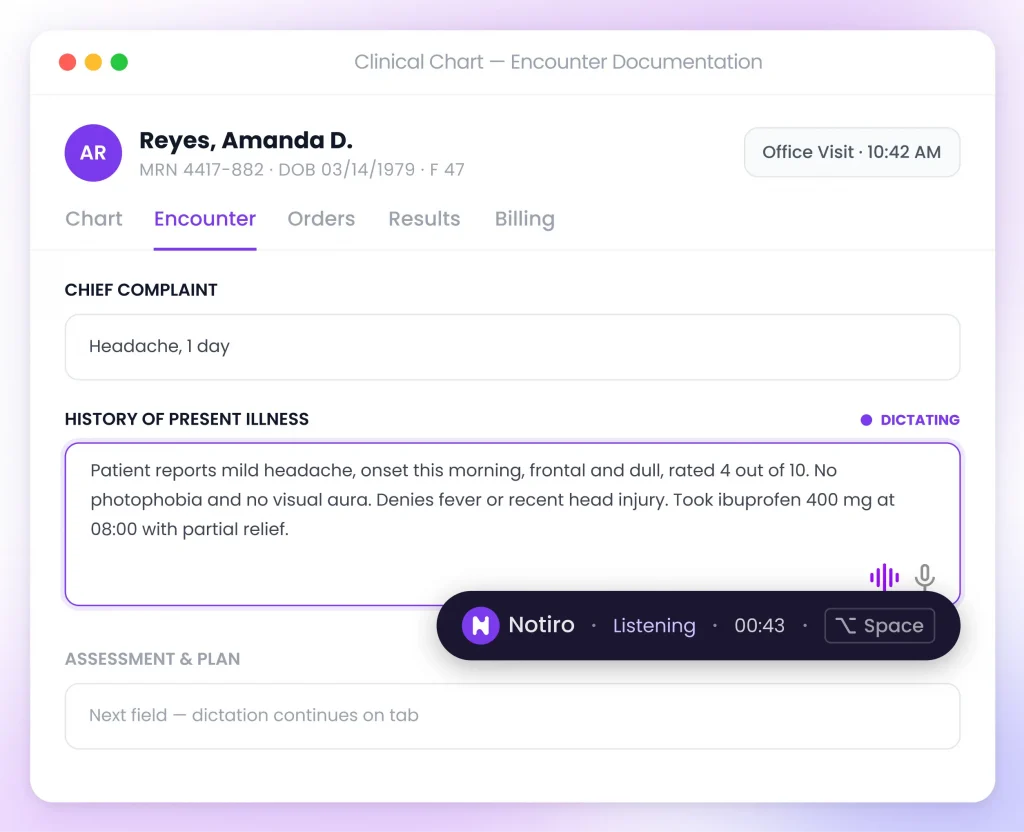
Place your cursor in any text field and start dictating. Notiro Just Speak turns your voice into text in real time—inside your EMR, emails, notes, browsers, and more.
Typing is slowing you down
Every extra minute spent typing is a minute away from your patient.
Too much typing
Manual documentation eats into appointment time and adds hours after clinic.
Documentation fatigue
Repetitive typing adds up to burnout by the end of the day.
Split attention
Switching between keyboard and patient breaks the flow of the visit.
Slower visits
Manual entry means fewer patients seen, or longer days to see them all.
How it works
From install to your first dictated note, in minutes.
01
Download the Desktop App
Install Notiro Desktop on your Windows computer in under a minute.
02
Open your EMR
Notiro Desktop runs quietly in the background alongside it.
03
Press the shortcut key
Click into any field and trigger dictation with a hotkey or headset button.
04
Start speaking
Speak naturally, the way you'd describe the visit to a colleague.
05
Watch text appear instantly
Formatted, accurate text lands directly in the active EMR field.
Works with the EMR you already have
No integration, no new system to learn. Notiro Desktop sits on top of your existing EMR and types for you.
Notiro Desktop works with most Windows-based EMRs. Not officially affiliated with the platforms listed.
Typing vs. Talking
Traditional Typing
- Manual typing
- Keyboard-only workflow
- Minutes per note
- Documentation after hours
Notiro Desktop
- Natural voice dictation
- Voice-first workflow
- Seconds per note
- Documentation in the room
Everything you need to dictate, not type.

AI Speech-to-Text
Medical-grade speech recognition trained for clinical language and high accuracy.
Direct EMR Dictation
Dictate directly into any active text field inside your EMR — no copy-paste.
Works Everywhere
Compatible with most Windows-based EMRs, cloud platforms and legacy systems alike.
Headset & Microphone Support
Works with standard microphones and supported medical headsets.
Keyboard Shortcuts
Start and stop dictation instantly with hotkeys you can fully customize.
AI Formatting
Dictated speech is automatically formatted into clean, readable clinical notes.
Fast & Responsive
Minimal delay between speaking and seeing text appear on screen.
HIPAA Compliant
Built with healthcare-grade security and patient privacy from the ground up.
Security built for healthcare
Every recording, transcript, and login is protected end to end.

HIPAA Compliant
Designed to meet HIPAA requirements for handling protected health information.

Encrypted Communication
Audio and text are encrypted in transit between the app and Notiro's servers.

Secure Authentication
Account access is protected with secure sign-in for every clinician.

Privacy-First Architecture
Built from the ground up around patient privacy, not added on afterward.
Frequently asked questions
Find quick answers to the most common questions about Notiro — how it works, what it documents, and how it fits into your clinical workflow.
Yes. Notiro Desktop works with most Windows-based EMRs by typing directly into the active text field, so it doesn't depend on a specific platform.
Notiro uses medical-grade speech recognition trained on clinical language, so it accurately captures terminology, drug names, and clinical shorthand.
Yes. All recordings and transcripts are encrypted in transit and at rest, and Notiro is built to meet HIPAA requirements for protected health information.
No. Notiro Desktop runs alongside your EMR — there's nothing to configure or integrate on the EMR side.