Desktop dictation apps have evolved far beyond basic speech-to-text tools. For healthcare professionals, the right solution can influence how quickly notes are completed, how much editing is required, and how smoothly documentation moves through the rest of the clinical workflow.
Choosing between different desktop dictation apps, therefore, requires more than comparing transcription speed or keyboard shortcuts. Medical speech includes specialized terminology, abbreviations, medication names, measurements, and contextual details that general-purpose speech-to-text software may struggle to interpret accurately.
Healthcare teams should closely examine what happens after a clinician begins speaking. Does the desktop dictation software understand clinical language? Can it organize information into a usable note? Does it connect with existing systems? How much manual review is required for the final output?
If you are comparing the best desktop dictation apps for healthcare, these eight features should be at the top of your checklist.
1. Medical Speech Recognition Accuracy
Accuracy should be one of the first features you evaluate when comparing desktop dictation apps because every transcription error creates another task for the clinician.
General voice dictation software may perform well with everyday conversations. Clinical documentation is different. Drug names, diagnoses, abbreviations, procedure names, measurements, and similar-sounding medical terms can easily be misinterpreted.
When testing dictation software for PC or Mac, use realistic clinical language rather than simple sample sentences. Dictate common medications, specialty-specific terminology, patient histories, and treatment plans.
Pay attention to how consistently the software recognizes clinical terms and how well it performs under normal office conditions.
Notiro is designed specifically for healthcare documentation. Its medically tuned AI captures clinical conversations in real time and turns them into structured clinical notes. This healthcare-focused approach helps clinicians spend less time correcting generic transcripts and more time reviewing useful documentation.
2. AI-Powered Note Structuring
Turning speech into text is useful. Turning speech into an organized clinical note is considerably more valuable.
Traditional desktop dictation software may produce blocks of text that still require significant manual organization. A clinician might need to move information into SOAP sections, remove conversational filler, correct formatting, and reorganize important clinical details.
Modern AI-powered desktop dictation apps can improve this process by understanding context rather than treating every spoken word as isolated text.
AI can help organize relevant information into structured documentation that is easier for clinicians to review.
Notiro uses AI to convert patient encounters into structured clinical notes. Clinicians can review and approve generated documentation instead of manually creating every section from the beginning.
This helps healthcare teams streamline documentation, reduce repetitive work, improve efficiency, and spend less time managing administrative tasks.
3. Real-Time Dictation Performance
Good voice dictation software should keep pace with the person speaking.
Long processing delays can interrupt a clinician’s thought process and reduce the practical benefits of voice documentation. If users regularly have to wait for transcription or processing, traditional typing may start to feel faster.
When comparing the best desktop dictation apps, consider how quickly each solution:
- Captures spoken information
- Converts speech into text
- Handles longer statements
- Processes clinical terminology
- Produces usable documentation
Performance should remain reliable during a normal clinical workload.
Notiro captures patient encounters in real time and uses AI to generate structured documentation for review. Instead of leaving clinicians with raw transcription that must be rebuilt later, Notiro is designed to shorten the journey from patient conversation to usable clinical documentation.
That distinction is important when comparing basic speech-to-text software with healthcare-focused AI documentation tools.
4. Editing and Correction Tools
No desktop dictation software should be evaluated under the assumption that its first output will always be final.
The more important question is – how easily can clinicians correct it?
Some tools still require users to find an incorrect sentence, move the cursor to the right location, rewrite the text, and adjust formatting manually. Across dozens of patient encounters, these small actions can consume a significant amount of time.
When comparing desktop dictation apps, look for features such as:
- Voice-based editing
- Simple text instructions
- Quick navigation
- Easy correction of individual details
- Automatic formatting
- Flexible note editing
Notiro includes Magic Edit, which allows clinicians to modify patient notes using voice or text instructions.
Instead of rewriting an entire note, clinicians can request a specific change and adjust only the relevant information. This helps make the review and correction process faster and reduces unnecessary manual work.
The goal of AI should not be to eliminate clinician oversight. It should make that oversight easier and more efficient.
5. EHR Integration
Fast dictation can still result in a slow workflow when documentation has to be manually transferred somewhere else.
For healthcare teams, EHR integration should therefore be a major consideration when evaluating desktop dictation apps.
Ask what happens once the note has been completed.
Does the clinician need to copy and paste information into the EHR? Are multiple applications involved? Does someone need to manually reformat the note before it can be added to the patient record?
Basic dictation software for PC may solve only the typing problem while leaving the rest of the documentation workflow unchanged.
Notiro approaches documentation as a connected clinical process rather than an isolated transcription task. Approved notes can be synced through EHR integrations, helping reduce unnecessary copying and movement between disconnected systems.
The right desktop dictation software should shorten the complete path from spoken information to completed documentation, not just replace keyboard input.
6. Privacy and Security
Healthcare dictation involves sensitive patient information. Privacy and security should never be treated as optional features.
Before choosing voice dictation software, healthcare organizations should understand:
- How audio is processed
- How text is stored
- How patient information is protected
- Where data is handled
- Which healthcare compliance safeguards are supported
This becomes especially important when comparing general-purpose speech-to-text software with platforms built specifically for clinical environments.
Notiro is designed for healthcare documentation and supports HIPAA-compliant workflows, helping healthcare organizations use AI-powered documentation while maintaining appropriate safeguards around sensitive patient information.
Healthcare teams should evaluate security alongside speed and convenience. A solution that saves a few minutes is not worth introducing unnecessary risk into the clinical workflow.
7. Workflow Automation Beyond Dictation
The best desktop dictation apps are not necessarily the ones that type the fastest. The strongest solutions are often the ones that remove the most manual work. Clinical documentation connects with several other activities, including:
- Medical coding
- Clinical orders
- Patient records
- Billing
- Follow-up documentation
- EHR updates
If a tool only converts speech into text, healthcare teams may still need to complete much of the surrounding workflow manually.
AI creates an opportunity to automate more of this process.
Notiro goes beyond traditional desktop dictation software by combining AI medical scribing, patient intake, clinical orders, medical coding support, and EHR integration.
Its AI helps transform information captured during patient encounters into structured documentation that can support the next stages of the clinical workflow.
This broader automation can help healthcare teams save time, reduce avoidable errors, improve consistency, streamline processes, and support better clinical and operational decision-making.
When comparing desktop dictation apps, ask one key question: What happens after transcription is complete?
The fewer manual steps required before documentation is complete, the more valuable the software becomes.
8. Fit for Real Clinical Workflows
A long feature list can look impressive on a product page. The real test is whether the software works during an ordinary clinical day.
When comparing desktop dictation apps, consider:
- Background noise
- Different speaking styles
- Specialty terminology
- Patient volume
- Preferred note formats
- Number of editing steps
- Compatibility with existing clinical workflows
Customization also matters. Rigid voice dictation software may force clinicians to change the way they already work. A stronger solution should adapt more naturally to existing documentation habits.
Notiro combines medically tuned AI, noise-resilient processing, customizable templates, structured notes, and EHR connectivity.
Its workflow follows a simple process: capture the encounter, generate structured documentation, review the note, approve it, and move it into the connected clinical workflow.
This allows healthcare teams to evaluate the platform based on real workflow value rather than transcription performance alone.
How to Choose the Best Desktop Dictation Apps for Healthcare
Start with your actual clinical workflow rather than a vendor feature checklist.
Test different desktop dictation apps using representative patient encounters and realistic medical terminology. Measure how much editing each tool requires, how quickly usable documentation is produced, how easily corrections can be made, and how smoothly information reaches the EHR.
If you are considering dictation software for PC, Mac, or multiple workstation environments, compatibility is important. However, healthcare organizations should also look beyond device support.
Consider whether the platform can:
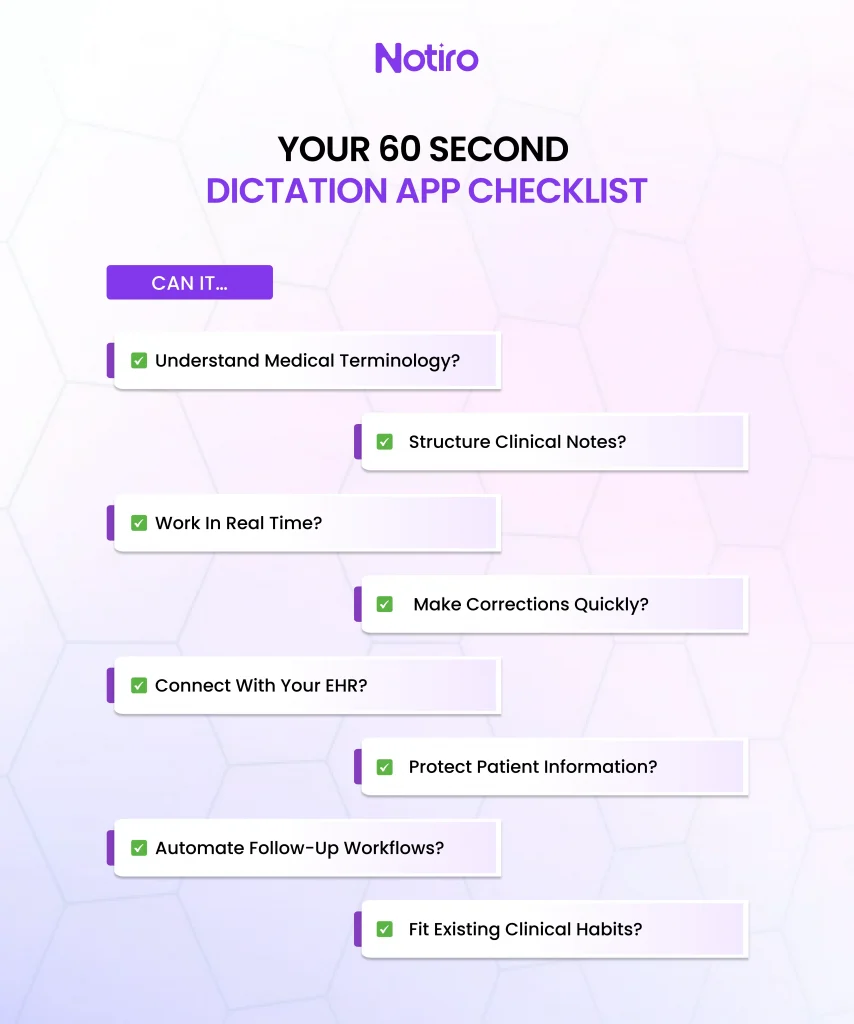
- Understand medical terminology
- Structure notes automatically
- Reduce editing time
- Integrate with clinical systems
- Protect sensitive information
- Automate related workflows
For healthcare teams, Notiro stands out as a leading AI clinical documentation solution because it brings real-time capture, medically tuned AI, structured notes, intelligent editing, workflow automation, coding support, and EHR integration into one connected experience.
Instead of operating like basic speech-to-text software, Notiro uses AI across the broader documentation workflow.
This helps healthcare organizations save time, reduce manual errors, improve efficiency, streamline documentation processes, and give clinicians more time to focus on patient care.
Desktop Dictation Software Should Do More Than Type
Desktop dictation used to mean replacing a keyboard with a microphone. AI has changed that expectation.
Today’s desktop dictation apps can do much more than convert speech into text. The right solution can understand medical language, organize documentation, simplify corrections, connect with existing clinical systems, and reduce the amount of repetitive work surrounding every patient note.
That changes the buying decision. Instead of asking only how accurately a piece of voice dictation software converts speech into text, healthcare teams should ask:
How much of the documentation workload does this software actually remove?
For practices looking to save clinician time, reduce unnecessary manual errors, and create a smoother documentation process, that difference matters.
Notiro represents the next generation of healthcare-focused desktop dictation software by using AI throughout the wider documentation workflow. The result is less time spent managing notes, fewer repetitive administrative steps, more efficient processes, and more opportunity for healthcare teams to focus their attention where it belongs: on patient care.